Introducing AI-Powered Donor Research Profiles
- Introducing AI-Powered Donor Research Profiles
- How to Turn First-Time Donors Into Repeat Donors (Without Begging)
- How to Know When (and Whether) to Apply for a Grant
- Stop Rebuilding the Same Reports | Roadmap Review April 2026
- Best Nonprofit Accounting Software: A Complete Guide
- Introducing the New Advanced Relationship Search in MonkeyPod
- 7 Steps to Launching an Effective Matching Gift Campaign
- Making a Data Management Plan: The Importance of Clean Data
- Data Transparency–The Secret to Unlocking Your Team's Potential
- How to Start a Nonprofit–A Checklist for New Organizations
- Unlock More Matching Gift Revenue with Less Effort: MonkeyPod + Double the Donation
- Automate Your Payroll With MonkeyPod and Gusto
You've got a major donor call on the calendar for next week. You know their name, you know what they've given before, and you know this conversation matters. So you do what any good development professional does: you start digging.
A LinkedIn search here. A news article there. A quick scan of board affiliations, a guess at giving capacity based on what you already know. Two or three hours later, you've got something — a few notes, a gut feeling, maybe a rough ask number you're not fully confident in. Then you take a deep breath and pick up the phone.
It works. But it's slow, it's hard to repeat across your full portfolio, and for every donor you research thoroughly, there are five more who get a generic outreach because there simply wasn't time.
What if you already knew?
Today, we're introducing Donor Research Profiles — a new feature in MonkeyPod that generates a ready-to-use cultivation brief for any major donor in your database. It starts with the data in your MonkeyPod, and then uses AI to enrich the data and create a comprehensive profile. And it's all done with one click. No configuration. No hours of manual research. No need for you to figure out how to prompt an AI.
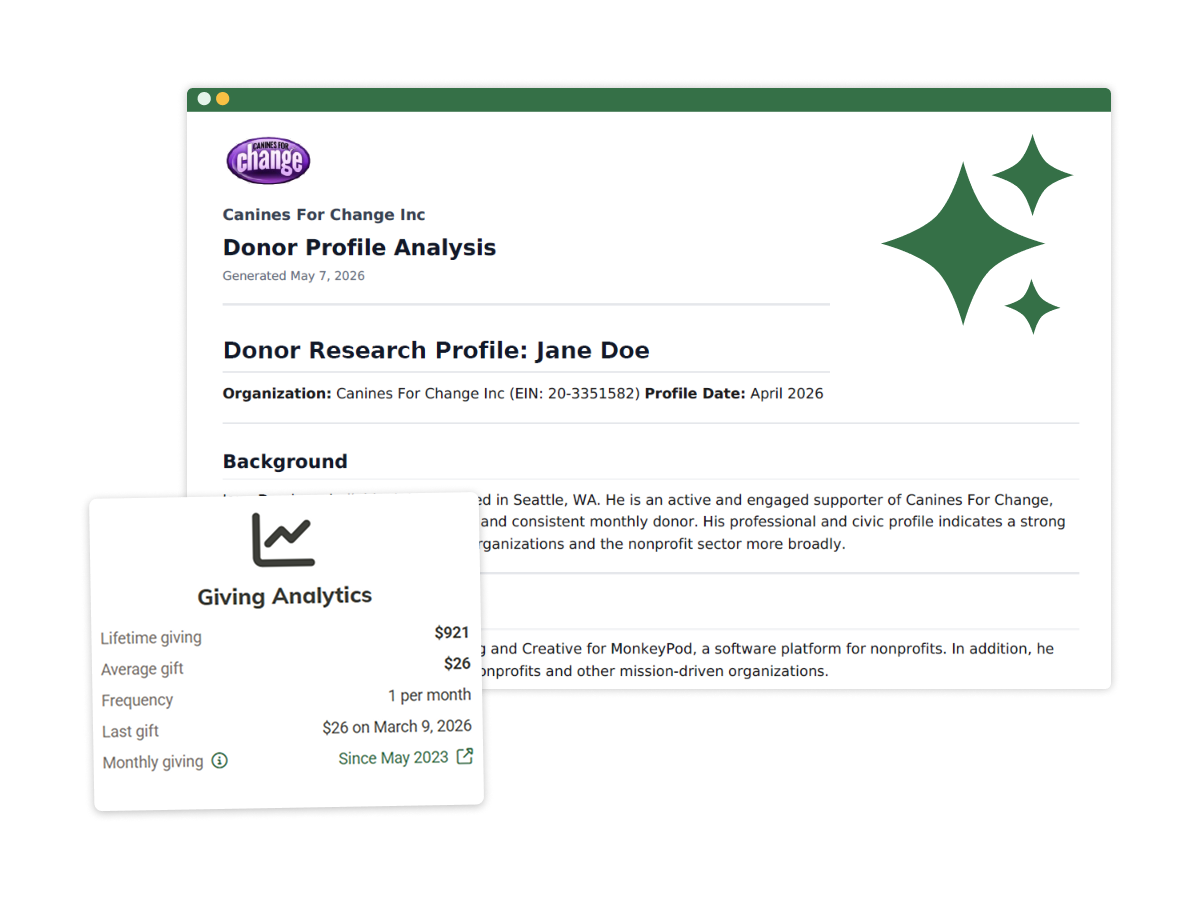
This isn't a chatbot you have to figure out how to use. It's AI embedded directly into the workflow where it can actually help — right before you reach out to a donor. You get a complete, actionable brief in the time it takes to make a cup of coffee.
What's in a Donor Research Profile?
Each profile is comprehensive and easily digestible summary of the donor. It drawson publicly available data and — crucially — what's already in your MonkeyPod. The profile is broken down into sections so you can find exactly the information you need. Some of those sections include:
Background — Where they live, family context, and confirmation that the record is current and active.
Career — A detailed professional history: current and past roles, industries, and organizational affiliations.
Education — Academic background and executive education, which often signals both giving capacity and areas of personal pride.
Philanthropic Activity — Board memberships, volunteer work, and involvement with other nonprofits. A window into what causes they care about and how they like to engage.
Political Giving — FEC filings and state-level contribution records, when available — a reliable indicator of overall philanthropic behavior.
Capacity Indicators — Wealth signals and an inferred giving capacity, including a specific recommended major gift range in dollar terms. Not a guess — a figure grounded in public data.
Connections — How this donor connects to your organization specifically. Shared interests, relevant expertise, and ties surfaced from your own relationship data.
Engagement Recommendations — This is the section development staff use most. It includes a named Cultivation Step (exactly what to do next), a Suggested Ask Range (a specific dollar figure), Rapport Hooks (conversation topics that will resonate), and Sensitivities (what to avoid). This is where research becomes strategy.
"I'm really impressed with the accuracy and organization of the data, as well as the suggested next steps for donor cultivation."
Emily Kohl | Fiscal Coordinator, Boxerwood Education Association
Your MonkeyPod data makes it smarter
Now of course, you could work with Claude or Chat GPT and ask them to look up a donor in your database. But what those tools don't have access to is the comprehensive history of your relationship with that donor.
But an all-in-one platform like MonkeyPod does.
A standalone donor research tool only knows what's publicly available. It can tell you what a donor has given to other organizations if those organizations have made that information available. But it can't see your giving history with them, your relationship notes, the last event they attended, or the email they opened three months ago.
MonkeyPod already holds all of that. Because your CRM, fundraising records, and communication history live in the same system, Donor Research Profiles can surface insights no external research tool could produce.
The more data you have in MonkeyPod the more complete and accurate the profile. If you have the donor's address, social media profiles, household connections, and giving history in MonkeyPod, you should be able to create a comprehensive donor profile in just a couple minutes.

A note on privacy
AI is all the rage right now, and there's a lot of potential for how it can help nonprofits increase their impact. But there are also understandable concerns about using AI, and MonkeyPod takes those concerns seriously.
Whenever you use AI in MonkeyPod, your data stays completely private. AI models are never trained on or fine-tuned using your organization's information. The research layer uses public sources only — your proprietary data never leaves MonkeyPod.
We also want to be transparent: profiles are generated from publicly available information, and accuracy isn't guaranteed. We recommend treating each profile as a strong starting point — a research brief to build on, not a source of record. Verify key details before your meeting, especially for high-stakes asks.
Where to find it and how to get started
Donor Research Profiles are available now for all Essentials, Pro, and Enterprise subscribers.
If you're already a MonkeyPod user, you can generate your first profile right now. Open the Fundraising menu and look for the Research and Reports section. Then select Donor Research Profiles. From there, all you need to do is search for a donor, and click Generate Profile. You can also access profiles directly from a donor's relationship record or from the Giving Analytics card on their page.
Each plan includes a monthly profile allowance — 5 profiles on Essentials, 20 on Pro, and 50 on Enterprise. Additional profiles are available for $2.00 each. As an admin, you can also configure who has the ability to view or generate profiles.
Once a profile is generated, you can email it as a PDF to any address — handy for sharing with a major gifts officer or executive director before a call. You can also re-generate a profile at any time to get a fresh read on updated public data.
Walk in prepared
Every major donor conversation is an opportunity — and preparation is what separates a confident ask from an anxious one. Development professionals who research their donors raise more money. That's not a novel insight. What's new is that it no longer has to take half a day.
If you're an Essentials, Pro, or Enterprise subscriber, your first profiles are waiting for you. Log in and give it a try — we think you'll find it changes how you approach your next major gift conversation.
Have questions or want to see it in action? Schedule a demo today!