Introducing the New Advanced Relationship Search in MonkeyPod
- Introducing AI-Powered Donor Research Profiles
- How to Turn First-Time Donors Into Repeat Donors (Without Begging)
- How to Know When (and Whether) to Apply for a Grant
- Stop Rebuilding the Same Reports | Roadmap Review April 2026
- Best Nonprofit Accounting Software: A Complete Guide
- Introducing the New Advanced Relationship Search in MonkeyPod
- 7 Steps to Launching an Effective Matching Gift Campaign
- Making a Data Management Plan: The Importance of Clean Data
- Data Transparency–The Secret to Unlocking Your Team's Potential
- How to Start a Nonprofit–A Checklist for New Organizations
- Unlock More Matching Gift Revenue with Less Effort: MonkeyPod + Double the Donation
- Automate Your Payroll With MonkeyPod and Gusto
Every nonprofit we talk to faces a similar challenge: your supporter data is rich with insight, but getting to that insight takes too long. You know the right donors, volunteers, and prospects are in your database — you just need a smarter way to find them.
That’s exactly what the newly redesigned Advanced Relationship Search in MonkeyPod is built to do.
Available starting March 18, 2026, the new interface gives you more power, more flexibility, and a cleaner experience for finding the constituents that drive your fundraising and impact.

A Smarter Way to Search
The foundation of Advanced Search is a simple but powerful concept: criteria, conditions, and actions.
- A criterion is a single filter — like “gave more than $500” or “lives within 10 miles.”
- A condition groups one or more criteria together using AND (narrow) or OR (broaden) logic.
- You can chain multiple conditions together to capture complex groups across your entire database.
For example: find individuals who purchased event tickets last year AND gave at least $1,000 AND have an active membership OR volunteer involvement. All in one search. With results in seconds.
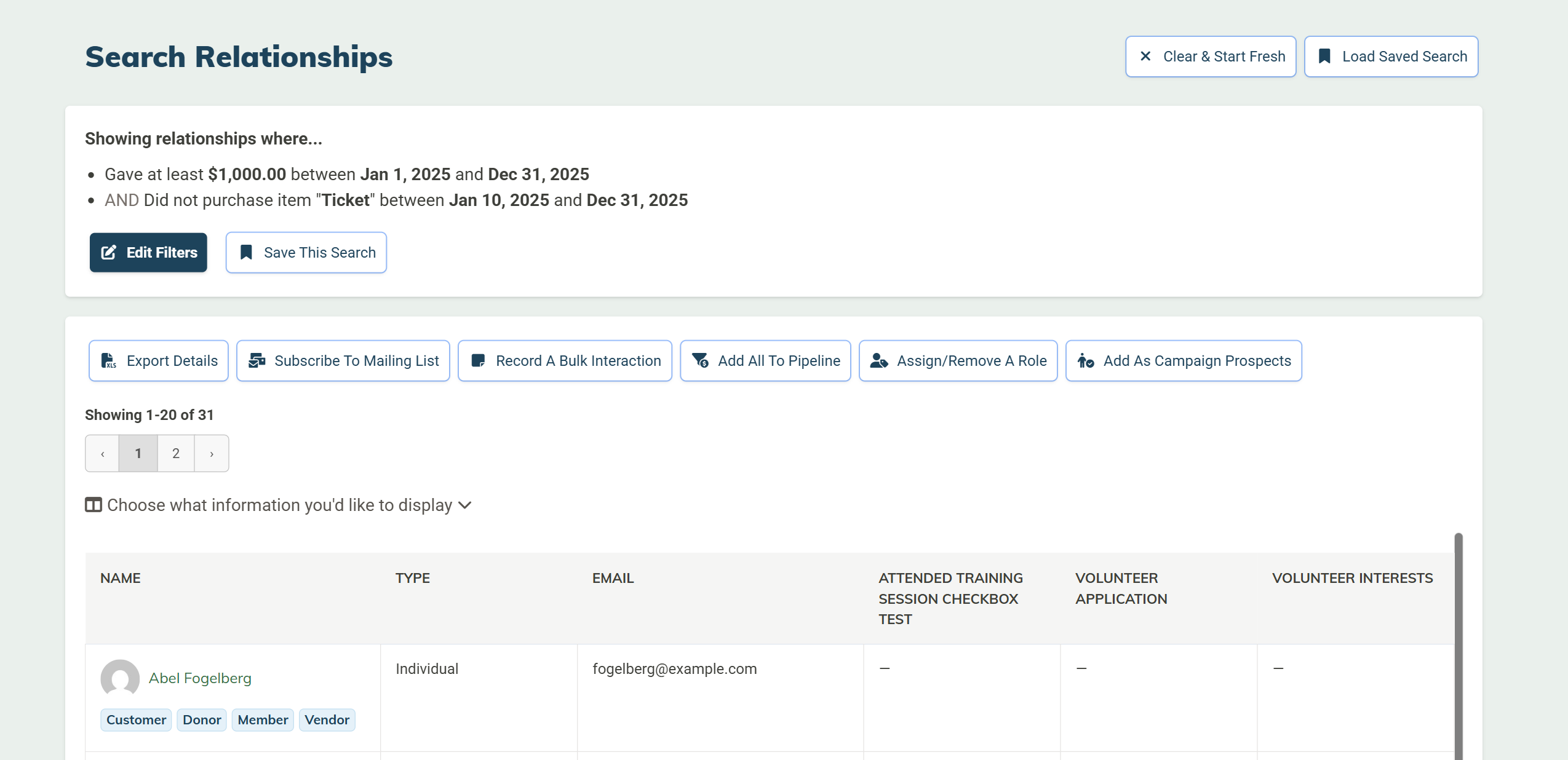
What You Can Search
The new Advanced Search supports dozens of criteria across every dimension of your supporter data:
- Basic information: name, organization, job title, relationship type, roles
- Giving: donation history, gift amounts, pledges, grants, recurring giving, soft credits
- Sales & purchases: ticket purchases, event attendance, purchase totals
- Vendor activity: payment history, billing totals
- Email engagement: open rates, click rates, subscription status
- Location: city, state, zip code, distance from an address, street address on file
- Memberships: active, inactive, expiring soon (requires Member HQ app)
- Volunteer activity: hours logged, areas of interest (requires Volunteer HQ app)
- And of course, all your Custom Attributes are searchable as well. The sky is truly the limit as you build and refine your queries.
Save, Share, and Act
Once you’ve built a search that works, save it. Saved searches are shared with your entire team in MonkeyPod and can be re-run at any time to return fresh, up-to-date results.
When you’re ready to act on your results, a full suite of bulk actions is available directly from the search results page:
- Export to CSV for mail merges or mailing labels
- Subscribe to a mailing list
- Record a bulk interaction
- Add to a cultivation pipeline
- Assign or remove a role to all found relationships
- Add as campaign prospects (Campaign Tracker users)
New: Smart Email Lists
With this new functionality, we're also excited to roll out an exciting enhancement to our email outreach features: Smart Email Lists.
When you save a search, you can use a saved search as the basis for a Smart Email List — a mailing list that automatically updates as your data changes. For example, you can create a smart list to identify people who volunteered this year but have not made a donation. As soon as someone makes a donation, they no longer meet the criteria, and are automatically removed from the list.
This makes it easy to reach exactly the right audience when you send your emails.
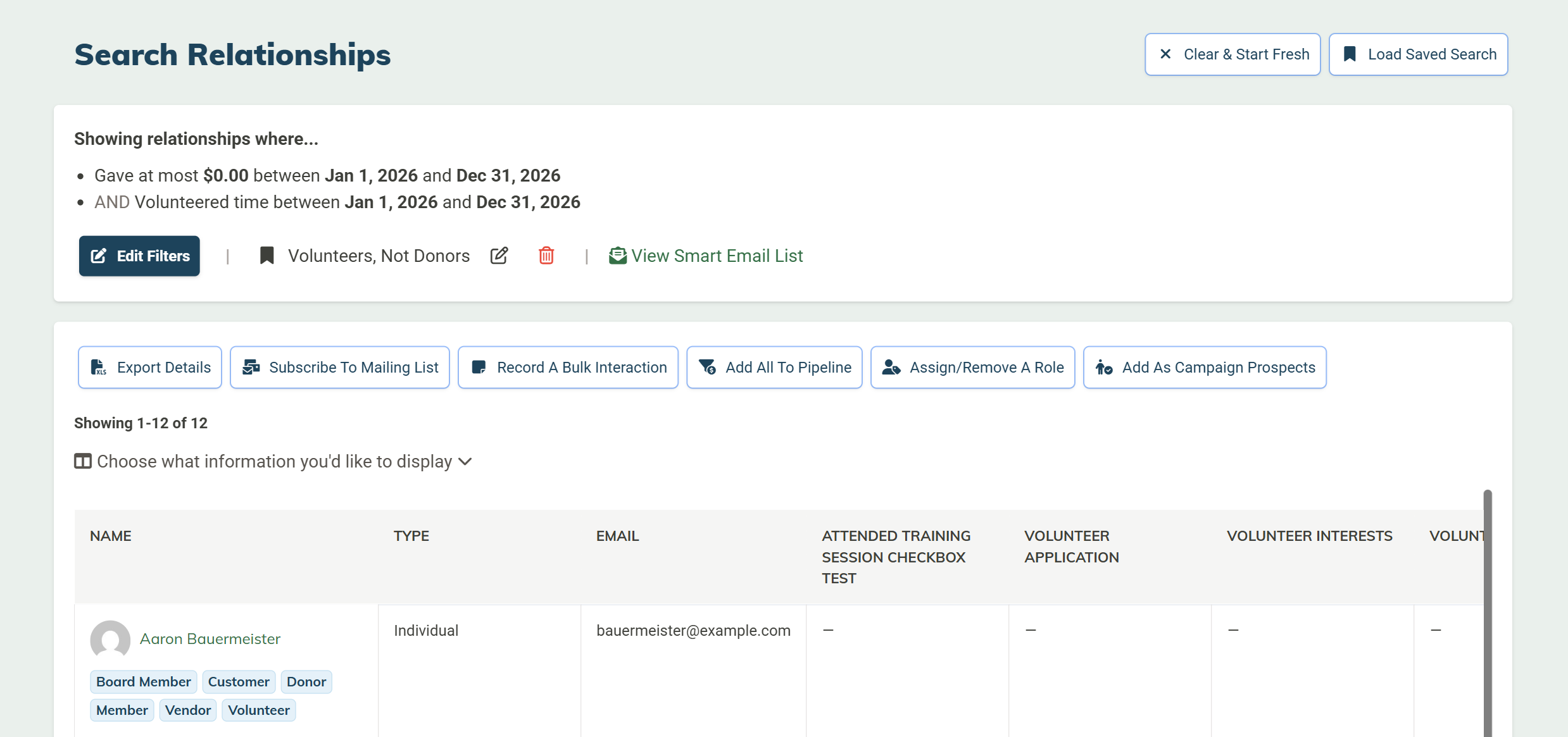
A Few Practical Examples
Still wondering what you’d actually use this for? Here are some of our favorite use cases:
Year-end appeal: Find donors who gave between $500 and $2,000 last year, plus ticket buyers who haven’t donated yet this year — and reach both groups in a single outreach pass.
Volunteer conversion: Find volunteers who logged more than 20 hours but have never made a financial gift. Add them to a pipeline so you can cultivate the relationship and steward a donation.
Warm prospect identification: Find email subscribers with high click rates who have never donated. These are likely ready for a first-time ask.
Board giving compliance: Find board members who haven’t made a gift this fiscal year. Flag for staff follow-up.
Event outreach: Find supporters who attended your gala last year and live within 25 miles. Send an early-bird invitation.
Get Started
The new Advanced Relationship Search is available now. Open the Relationship menu and select Advanced Search in your MonkeyPod account to try it out. Full documentation — including step-by-step instructions and screenshots — is available in our Help Center.
Not yet a MonkeyPod user? We’d love to show you what’s possible. Schedule a free demo at monkeypod.io/demo